// BETA PROGRAM
BLOCK EDIT.
Thanks for testing Block Edit. It’s an iPhone and iPad app that controls and edits your Fractal Axe-Fx II or III in real time over MIDI — presets, scenes, the amp block, and the routing grid. This page covers how to get in, how to connect, what to test, how to report what breaks, and how to help us add support for your unit.
Your presets are safe. Block Edit only ever writes to the edit buffer — the same temporary space the unit uses while you turn knobs on the front panel. It never sends Save or Store. If anything ever looks off, power-cycle the unit and every stored preset is exactly where you left it.
// INSTALL
- Install the TestFlight app from the App Store.
- Open the invite email and tap View in TestFlight (or enter the code).
- Install Block Edit and launch it.
// CONNECT YOUR RIG
You need a unit connected — there’s no demo data, so an empty screen just means it isn’t seeing your hardware yet. Block Edit works with the Axe-Fx III and the full Axe-Fx II family:
- Axe-Fx III— connect over USB. It’s class-compliant, so plug it straight into your iPad or iPhone (USB-C, or a camera adapter) and it shows up.
- Axe-Fx II, Axe-Fx II XL, and Axe-Fx II XL+(including the original Mark I and Mark II) — use a Bluetooth MIDI adapter (e.g. WIDI) or a 5-pin DIN MIDI interface. The II’s USB isn’t iOS-compatible.
When it connects, the top bar names the unit and turns green.
Proven on real hardware. Block Edit has been tested on both the Axe-Fx II and the Axe-Fx III — over USB and over Bluetooth (via WIDI).
// WE WANT EVERY UNIT
We’re aiming for full coverage across the Fractal lineup. If you own any of these units, your testing matters most right now — connect it, run through the checklist below, and report back:
- Axe-Fx Ultra
- FM9
- FM3
- AM4
- VP4
- AX8
- FX8
Even a “it connected and presets work” report is valuable. Use the bug report form at the bottom of this page.
If your unit won’t connect, we’re probably just missing one byte from it — that’s a two-minute fix. Here’s how to grab it →
// GOING WIRELESS — THE WIDI ADAPTER
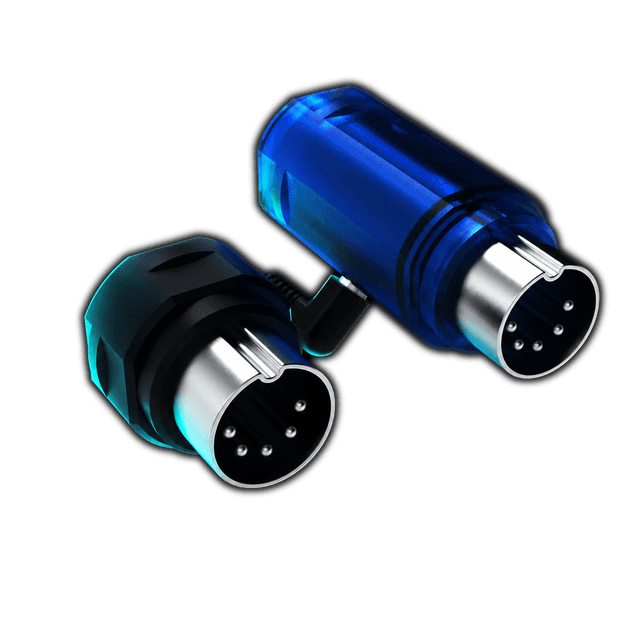
A WIDIadapter (by CME) is a small Bluetooth-MIDI dongle that plugs into a Fractal unit’s 5-pin DIN MIDI ports and connects it to your iPhone or iPad over Bluetooth. Hook it to MIDI IN and OUT, pair it in iOS Bluetooth, and you’re on the air — no cables. It draws power from the MIDI port itself, so there are no batteries to charge or replace.
The exact adapter we’ve tested with — WIDI on Amazon →
// WHY BLUETOOTH OFTEN BEATS USB ON OLDER UNITS
The Axe-Fx III is USB class-compliant — iOS recognizes it instantly, no driver needed. Older hardware (Axe-Fx II, Ultra, AX8, and others) uses a proprietary USB stack that requires a desktop driver. That driver doesn’t exist for iOS, so the USB port on those units is a dead end on iPhone and iPad.
The 5-pin DIN MIDI ports, though, are plain 40-year-old MIDI — universally understood by everything. WIDI bridges those ports to Bluetooth LE MIDI, which iOS has supported natively since iOS 8. No drivers, no adapter chains. On older Fractal hardware, Bluetooth is the cleaner connection.
On an Axe-Fx III? Skip the WIDI — plug straight in with a USB-C cable. Recommended cable on Amazon →
// WHAT TO TEST
Run these and tell me anywhere the app and the unit disagree:
- Connect — does the top bar show the right model (II vs III) and go green?
- Presets & scenes — on the GRID page, step through presets and scenes. Does the unit follow instantly?
- Amp edit — on EDIT, move the knobs and flip Boost / Cut / Fat / Bright. Do the app and the unit stay in sync?
- Grid— does the routing shown match what’s on your unit’s screen?
- Tuner & tap — does the tuner engage, and does tap-tempo land?
- Perform — does the PERFORM pad feel right under your thumb?
- Unplug mid-session — does it disconnect cleanly (no freeze, no crash) and recover when you reconnect?
// KNOWN LIMITATIONS — NOT BUGS as of June 17, 2026
- Axe-Fx II scene names— the II doesn’t store scene names, so Block Edit shows scene numbers there.
- Wah, Cab, and Synth blocks aren’t calibrated yet— they’re intentionally locked so a wrong value can’t reach your rig.
- No preset import/export yet — editing is parameter-by-parameter for now.
// HOW BLOCK EDIT GETS BUILT
Fractal doesn’t publish the SysEx protocol. Everything Block Edit knows about how to talk to an Axe-Fx was reverse-engineered by watching the bytes that flow between Axe-Edit and the unit — call it probing. We’ve done this on the Axe-Fx III and the Axe-Fx II XL from scratch.
Every Fractal unit announces itself with a one-byte ID inside a SysEx header that starts with F0 00 01 74. That byte is all we need to add support for a new unit. If you own an Axe-Fx model we haven’t confirmed yet, you can grab it in about two minutes.
// MAC — MIDI MONITOR
- Download MIDI Monitor (free, by Snoize) and open it.
- Plug your Axe-Fx into the Mac over USB.
- Open Axe-Edit (the official Fractal editor) — or just power-cycle the unit so it sends its startup message.
- In MIDI Monitor, look for a line that starts with
F0 00 01 74. The byte immediately after is the unit ID. Copy the full line and send it our way.
// ALTERNATIVE — FRACTAL-BOT
No editor installed? Start a backup in Fractal-Bot and watch the SysEx traffic in your MIDI monitor — the F0 00 01 74 line shows up in the first few exchanges.
If none of that sounds fun, just email and we’ll do a 2-minute screen share. Either way, paste your unit model, firmware version, and the F0 00 01 74 line into the form below and we’ll have your unit in the next build.
// SUBMIT YOUR UNIT ID
// FOUND A BUG?
In the app: tap the connection indicator in the top bar — the small icon that shows your connection status and turns green when a unit is online. That opens the Connection panel; Report a Bug is the last section, at the bottom. It builds an email with app version, your device, your connected unit, and the raw MIDI log — you review it before it sends.
The more detail you give — what you did, what the unit did, what the app did — the faster it gets fixed. Or use the form below.
// WEB BUG REPORT
// WHAT BLOCK EDIT CONTROLS
UNITS
| Your Fractal unit | Load presets | Live performance | Deep editing |
|---|---|---|---|
| Axe-Fx III — Original, Mark II, Mark II Turbo | ✅ | ✅ | ✅ Live |
| Axe-Fx II / II XL | ✅ | ✅ | Next |
| Axe-Fx Ultra | ✅ | ✅ | Next |
| FM9 | ✅ | ✅ | Next |
| FM3 | ✅ | ✅ | Next |
| AM4 | ✅ | ✅ | Next |
| VP4 (effects only) | ✅ | ✅ | Next |
| AX8 | ✅ | ✅ | Next |
| FX8 (effects only) | ✅ | ✅ | Next |
* Not every unit confirmed yet — see “How Block Edit Gets Built” to the left.
// COMPATIBLE iOS DEVICES
iPHONE
- iPhone 16 Pro Max
- iPhone 16 Pro
- iPhone 16 Plus
- iPhone 16
- iPhone 15 Pro Max
- iPhone 15 Pro
- iPhone 15 Plus
- iPhone 15
- iPhone 14 Pro Max
- iPhone 14 Pro
- iPhone 14 Plus
- iPhone 14
- iPhone 13 Pro Max
- iPhone 13 Pro
- iPhone 13
- iPhone 13 mini
- iPhone 12 Pro Max
- iPhone 12 Pro
- iPhone 12
- iPhone 12 mini
- iPhone SE (3rd gen)
- iPhone SE (2nd gen)
iPAD
- iPad Pro 13" (M4)
- iPad Pro 11" (M4)
- iPad Pro 12.9" (M2)
- iPad Pro 11" (M2)
- iPad Air 13" (M2)
- iPad Air 11" (M2)
- iPad Air (5th gen)
- iPad (11th gen)
- iPad (10th gen)
- iPad (9th gen)
- iPad mini (A17 Pro)
- iPad mini (6th gen)
PARAMETERS
GLOBAL CONTROLS (no block needed)
- Bypass on/off — per block
- Channel (A/B/C/D) — per block
- Scene select — 0–7
- Preset name — read any preset by number
- Scene name — read any scene
- Tempo — get/set BPM
- Tap tempo
- Full status dump — all blocks’ bypass + channel at once
BLOCK PARAMETERS — 32 calibrated blocks
| BLOCK | KEY CONTROLS |
|---|---|
| Amp | Gain, Bass, Mid, Treble, Master, Presence, Depth, Level, Overdrive, Input Trim, MV Trim, Bright Cap, Hi Treble, Balance, Bright/Boost/Cut/Fat |
| Cab | Mic 1 Level, Mic 1 Pan, Level, Room, Mic Distance, Distance, Low/High Cut, Room Freq |
| Drive | Drive, Tone, Level, Mix, Low Cut, High Cut, Mid Freq, Balance |
| Compressor | Threshold, Ratio, Attack, Release, Knee, Mix, Level, Makeup Gain, Detector, Low/High Cut, Input Level |
| Delay | Time, Master Feedback, Feedback, Mix, Low/High Cut, Drive, Level, Balance, Echo Pan |
| Reverb | Time, Predelay, Size, Mix, Early Level, Late Level, Low/High Cut, Mod Rate/Depth, Echo Density, Diffusion |
| GEQ | 8 bands (31Hz–4kHz), Level, Master Q, Balance |
| PEQ | Band 1–5 Gain, Band 1–5 Freq, Level |
| Chorus | Rate, Depth, Delay Time, Voices, Mix, Level, Balance, Low/High Cut |
| Flanger | Rate, Depth, Feedback, Manual, Mix, Level, Low/High Cut, Max Time, Bass Focus, Stereo Spread |
| Phaser | Rate, Depth, Feedback, Manual, Mix, Level, Min/Max Freq, Low/High Cut |
| Pitch | Voice 1/2 Detune, Voice 1/2 Level/Delay/Feedback, LFO Rate, Mix, Level, Balance |
| Wah | Min/Max Freq, Resonance, Control, Level, Low Cut, Bypass Mode |
| Filter | Frequency, Q, Gain, Order, Low/High Cut, Level, Mix, Balance, Pan, Phase Invert, Delay Time, LFO Rate/Depth |
| Rotary | Rate, Depth, Horn Level, Mix, Level, Low Rate Mult, Time Constant |
| Tremolo | Rate, Depth, Mix, Level, Filter Freq |
| Gate/Expander | Threshold, Attack, Release, Hold, Ratio, Level, Range |
| Multiband Comp | Lo/Hi Crossover, Lo/Mid/Hi Thresh/Ratio/Gain/Attack/Release, Mix, Level |
| Vocoder | Bands, Low/High Freq, Q, Attack, Release, Mix, Level |
| Formant | Vowel A, Vowel B, Control, Mix, Level, Resonance |
| Ring Mod | Frequency, Amount, Mix, Level, High Cut |
| Resonator | Mix, Q, Feedback, Res 1–4 Freq |
| Megatap | Mix, Time, Taps, Feedback |
| Ten-Tap | Time, Feedback, Mix, Level, Low/High Cut |
| Multitap | Tap 1–4 Level, Tap 1–4 Time |
| Volume/Pan | Volume, Pan, Level, Swell Thresh, Swell Attack/Release |
| Synth | V1/V2/V3 Freq/Level/Attack, Master Mix, Level |
| Mixer | Ch 1–4 Level/Pan, Master Level |
| Crossover | Freq, Low/High Level, Level |
| Enhancer | Width, Depth, Low/High Cut, Level |
| Multiplexer | Level, Balance |
| IR Player | Low/High Cut, Level, Balance, Level A/B, Mix |